> For the complete documentation index, see [llms.txt](https://cityweft.gitbook.io/docs/llms.txt). Markdown versions of documentation pages are available by appending `.md` to page URLs; this page is available as [Markdown](https://cityweft.gitbook.io/docs/geometry/topography.md).
# Topography
Topography is a core geometry type in Cityweft API. It consists of meshes or elevationMaps that represent the terrain surface.
Topography is returned when `'topography'` is in `settings.geometry` (or `topographyModel: true`). The return format is controlled by `settings.topographyReturnType`: `'elevationMap'` (default), `'meshes'`, or `'both'`.
Geometry Type: `meshes`
```javascript
{
"type": "topography",
"geometryType": "meshes",
"meshes": Mesh[]
},
```
Geometry Type: `elevationMaps`
{% hint style="info" %}
Recommended (and the default). \~94% of data saving in comparison to topography in meshes
{% endhint %}
```javascript
{
"type": "topography",
"geometryType": "elevationMaps",
"elevationMaps": ElevationMap[]
},
```
What does a `Mesh` element contain? This is the example:
```javascript
{
// The most important element of any meshed geometry for visualization
"vertices": [x1, y1, z1, x2, y2, z2, ...],
},
```
What does an `ElevationMap` element contain? This is the example:
```javascript
{
// Grid of elevation values, row by row
"elevationMap": [z1, z2, z3, ...],
"info": {
"width": 689.82,
"height": 948.50,
"segmentsWidth": 36,
"segmentsHeight": 99,
"moveVector": {
"x": 201.72,
"y": 278.19
}
},
},
```
| Name | Value |
| ------------------------------ | --------------------------------------------------- |
| width / height | height and width in meters of the topographic array |
| segmentsWidth / segmentsHeight | number of segments in elevationMap |
| moveVector | position of elevationMap |
{% hint style="info" %}
By default the per-tile elevation maps are merged into **one grid** covering the whole site (`combineElevationMaps: true`). Set it to `false` to receive one elevation map per terrain tile.
{% endhint %}
{% hint style="warning" %}
Using an `elevationMap` array instead of a mesh for topography offers better performance and visual quality, especially in Three.js. With `PlaneGeometry`, elevation data can be applied directly to create smooth, continuous surfaces with fewer artifacts, and it's easier to control resolution, level of detail, and styling dynamically.
{% endhint %}
| | |
| -------------------------------------------------------------------------------------------------------------------------------------------------------------------------------------------------------------------------------------------------------------------------------------------- | ------------------------------------------------------------------------------------------- |
| 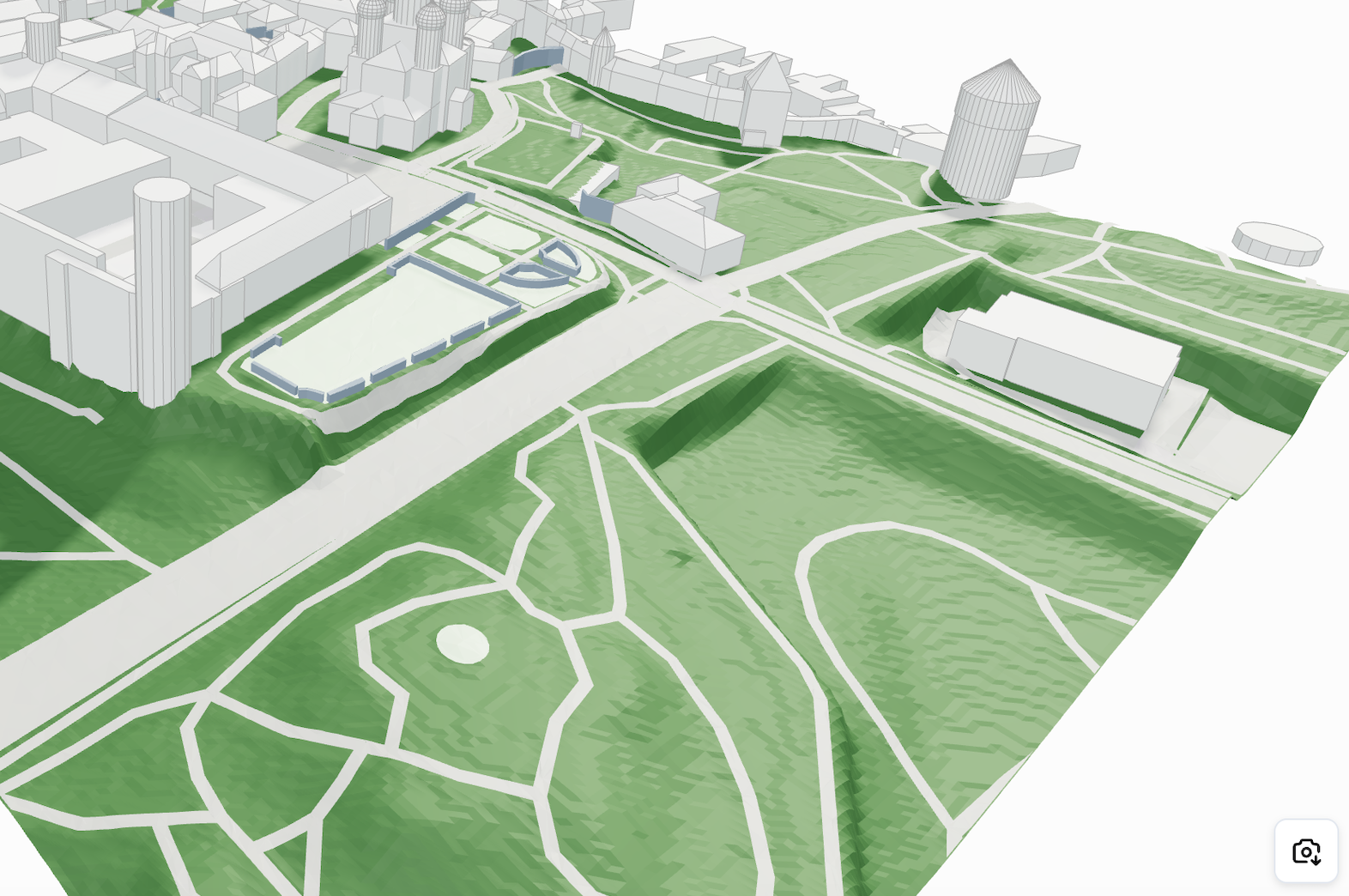 | **Mesh:** Bumpy geometry, large file size |
|
| **Mesh:** Bumpy geometry, large file size |
| 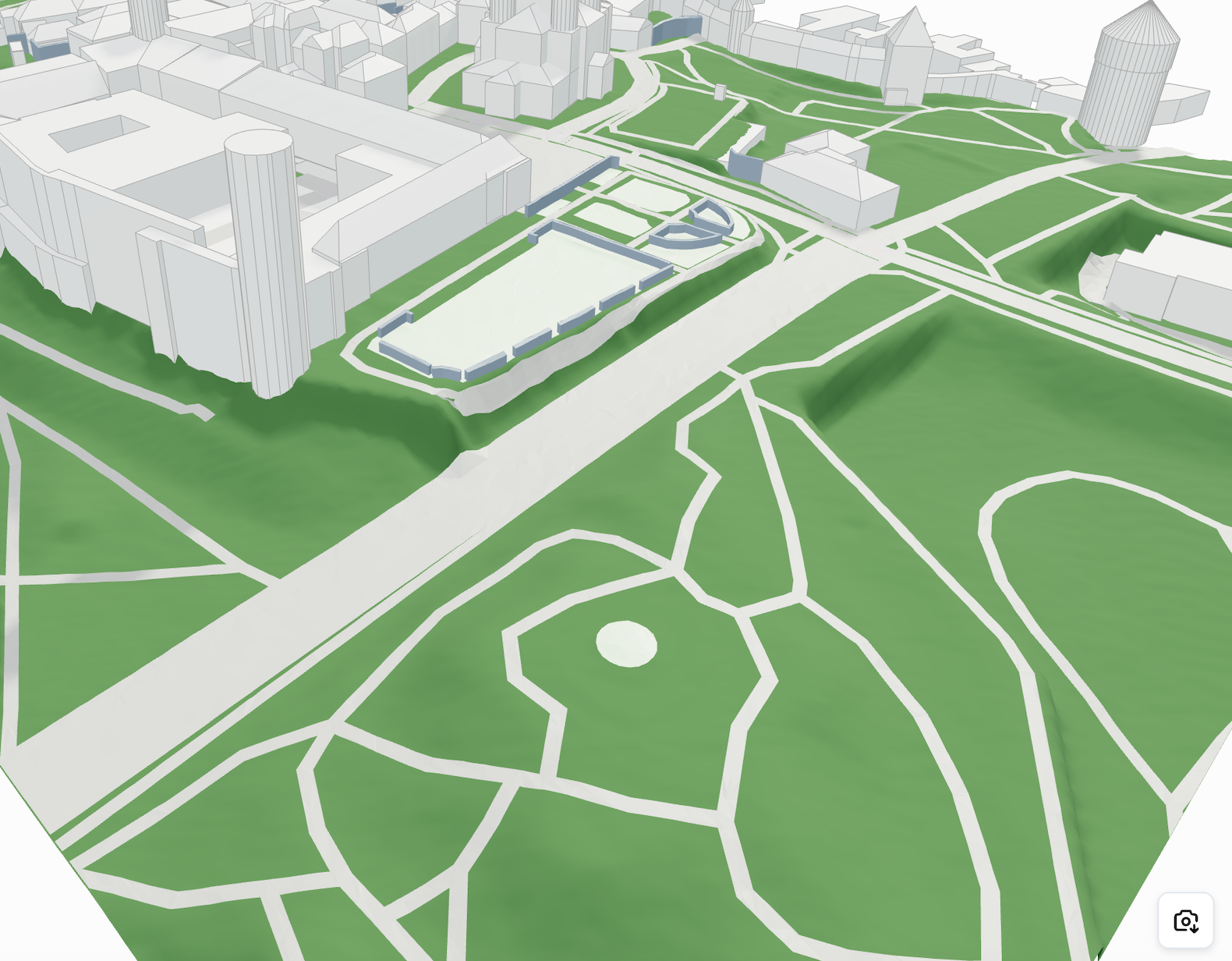 | **Plane geometry with elevation maps:** Smooth surface, optimized performance and file size |
#### Elevation Map Example in Three.js
```javascript
// Assuming you have received geometry with elevationMap data
const { elevationMap, info } = elevationMaps[0];
const { width, height, segmentsWidth, segmentsHeight, moveVector } = info;
// Create plane geometry matching the elevation grid
const planeGeometry = new THREE.PlaneGeometry(
width,
height,
segmentsWidth,
segmentsHeight
);
// Apply elevation map
if (elevationMap && elevationMap.length > 0) {
const positionAttribute = planeGeometry.attributes.position;
for (let i = 0; i < positionAttribute.count; i++) {
if (elevationMap[i] !== undefined) {
positionAttribute.setZ(i, elevationMap[i]);
}
}
positionAttribute.needsUpdate = true;
planeGeometry.computeVertexNormals();
}
// Create material
const material = new THREE.MeshStandardMaterial({
color: 0x95a5a6,
wireframe: false,
side: THREE.DoubleSide
});
// Create the terrain mesh and position it with moveVector
const terrain = new THREE.Mesh(planeGeometry, material);
terrain.position.set(moveVector.x, 0, moveVector.y);
// Add to scene
scene.add(terrain);
```
| **Plane geometry with elevation maps:** Smooth surface, optimized performance and file size |
#### Elevation Map Example in Three.js
```javascript
// Assuming you have received geometry with elevationMap data
const { elevationMap, info } = elevationMaps[0];
const { width, height, segmentsWidth, segmentsHeight, moveVector } = info;
// Create plane geometry matching the elevation grid
const planeGeometry = new THREE.PlaneGeometry(
width,
height,
segmentsWidth,
segmentsHeight
);
// Apply elevation map
if (elevationMap && elevationMap.length > 0) {
const positionAttribute = planeGeometry.attributes.position;
for (let i = 0; i < positionAttribute.count; i++) {
if (elevationMap[i] !== undefined) {
positionAttribute.setZ(i, elevationMap[i]);
}
}
positionAttribute.needsUpdate = true;
planeGeometry.computeVertexNormals();
}
// Create material
const material = new THREE.MeshStandardMaterial({
color: 0x95a5a6,
wireframe: false,
side: THREE.DoubleSide
});
// Create the terrain mesh and position it with moveVector
const terrain = new THREE.Mesh(planeGeometry, material);
terrain.position.set(moveVector.x, 0, moveVector.y);
// Add to scene
scene.add(terrain);
```