> For the complete documentation index, see [llms.txt](https://cityweft.gitbook.io/docs/llms.txt). Markdown versions of documentation pages are available by appending `.md` to page URLs; this page is available as [Markdown](https://cityweft.gitbook.io/docs/basics/usage-limits.md).
# Usage limits
Cap how much area an API key can request each billing period, and get an email before it reaches the cap.
A usage limit caps the area a single API key can request in a billing period. Use one to keep an integration inside a budget, or to give a test key its own small allowance.
## What counts
A limit counts the area of every successful API request made with that key, including requests made by Cityweft plugins. Area is counted in steps of 0.1 km².
Each key has its own limit, and keys without one are not capped. Models you export in the Cityweft web app don't count towards a limit, but they still use your plan's allowance.
## Set a limit
{% hint style="info" %}
Only organization admins can set or change limits on an organization's keys.
{% endhint %}
1. Open **API / Plugin Keys** in the [Cityweft web app](https://app.cityweft.com).
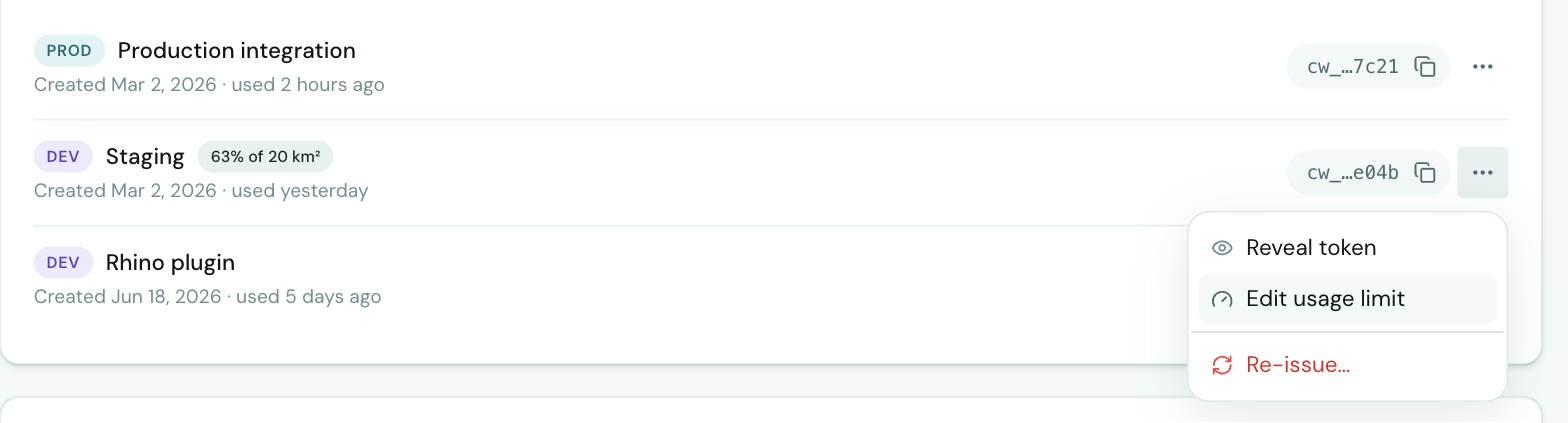
2. In the **Tokens** list, open the **⋯** menu next to the key.
3. Click **Set usage limit** (or **Edit usage limit** if it already has one).
4. Enter the limit in km² per billing period.
5. Choose **Pause requests** or **Only notify**.
6. Choose when to be emailed, then click **Save**.\
A key with a limit shows how much of it is used next to its name, for example **63% of 20 km²**.
## What happens at the limit
When you set a limit, you choose what happens when it's reached:
| Option | What happens |
| ------------------ | -------------------------------------------------------------------------------------------------------------------------------------------------------------- |
| **Pause requests** | A request that would go past the limit is refused with a `429` response, until the limit resets or you raise it. Smaller requests that still fit keep working. |
| **Only notify** | Requests keep running past the limit. You get an email when it's reached. |
## Email alerts
Choose to be emailed at 50%, 75% or 90% of a limit (75% and 90% are selected by default). Everyone is also emailed at 100%.
* For an organization's keys, every organization admin gets the emails.
* For a personal account's keys, the account holder does.
Each alert is sent once per billing period.
{% hint style="info" %}
Alerts come from ****. Add it to your contacts, or ask your IT team to allow it, so the emails don't end up in spam or get blocked by your email provider.
{% endhint %}
## When limits reset
Limits follow your plan's billing period, so a limit lines up with the allowance on your invoice. If your plan renews on the 6th, your limits reset on the 6th too.
Without a monthly subscription (for example with a bundle), limits follow the calendar month and reset on the 1st at 00:00 UTC.
The limit dialog shows when the next period starts.
## When requests are paused
When a key reaches a limit set to pause, it's marked **Paused** in the Tokens list.
API requests with that key are refused with `429 Too Many Requests` and a body like this:
```json
{
"error": "Usage limit reached",
"code": "USAGE_LIMIT_REACHED",
"limitKm2": 20,
"usedKm2": 19.8,
"remainingKm2": 0.2,
"requestKm2": 0.4,
"periodStart": "2026-09-06T09:00:00.000Z",
"resetsAt": "2026-10-06T09:00:00.000Z",
"message": "This token's monthly API limit of 20 km² has 0.2 km² left, and this request needs 0.4 km². It resets on October 6, or raise it at https://app.cityweft.com/api-tokens."
}
```
* `remainingKm2` is what's left in this period. A smaller area may still fit.
* `resetsAt` is when the limit resets.
{% hint style="warning" %}
Don't retry a `429` automatically. It keeps failing until the limit resets or someone raises it. Show the `message` to your users instead.
{% endhint %}